Why 0.1 + 0.2 != 0.3 in C++: the bits of 0.1
0.1 + 0.2 == 0.3 is false in C++. The real 64 bits of 0.1 show why: its mantissa is 1001 repeating, cut off at 52 bits and rounded up.
Why is 0.1 + 0.2 != 0.3 in C++? Because a double cannot hold 0.1, 0.2 or 0.3 exactly. It holds the nearest binary fraction, and the rounding errors of 0.1 and 0.2 add up to a sum that lands on a different double than 0.3. Here are the real bits.
This is the written version of Understanding C++ #6. It builds on #5, where a double turned out to be 64 bits: one sign bit, eleven exponent bits and fifty-two mantissa bits. Everything below comes from one program, compiled with g++ -std=c++20 -Wall -O2 on x86-64 Linux.
What are the bits of 0.1?
The program copies each double into a 64-bit integer with std::bit_cast<std::uint64_t> and prints it as hex. For 0.1 that is 3FB999999999999A: 3F B9, then a run of nines, then 9A.
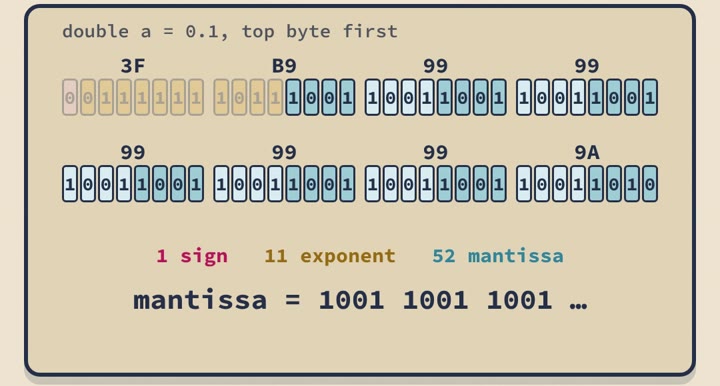
Split into the fields from episode #5:
| field | bits | value |
|---|---|---|
| sign | 1 | 0 |
| exponent | 11 | 0x3FB = 1019, so 2^(1019 - 1023) = 2^-4 |
| mantissa | 52 | 0x999999999999A |
Hex 9 is 1001, so the mantissa is 1001 1001 1001 ..., twelve times, and then 1010 (hex A).
Why does the pattern repeat?
A finite binary fraction is some integer divided by a power of two. One tenth is 1 / (2 × 5), and no power of two is a multiple of 5, so 1/10 has no finite binary form. Long division in base 2 gives
0.1 = 0.0001 1001 1001 1001 1001 ... (binary, forever)
That is 1.1001 1001 1001 ... × 2^-4: the implied leading 1, then the repeating 1001 the mantissa shows.
What happens at bit 52?
The mantissa has room for fifty-two bits. The bits after them are 1001..., which is more than half of the last place, so the hardware rounds up: the last nibble 1001 becomes 1010. That is the A at the end of the hex.
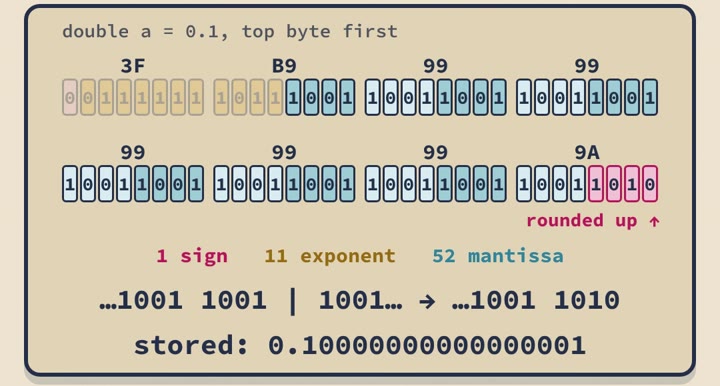
So the double called 0.1 is slightly more than one tenth. Printed with 17 significant digits (%.17g, enough to tell any two doubles apart) it is 0.10000000000000001.
What about 0.2 and the sum?
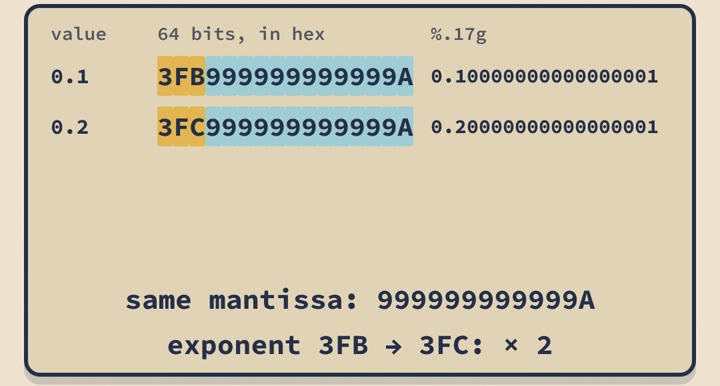
0.2 is 0.1 times two. In binary that only moves the point, so 0.2 has the same mantissa and an exponent one higher: 3FC999999999999A. It is rounded up by the same relative amount.
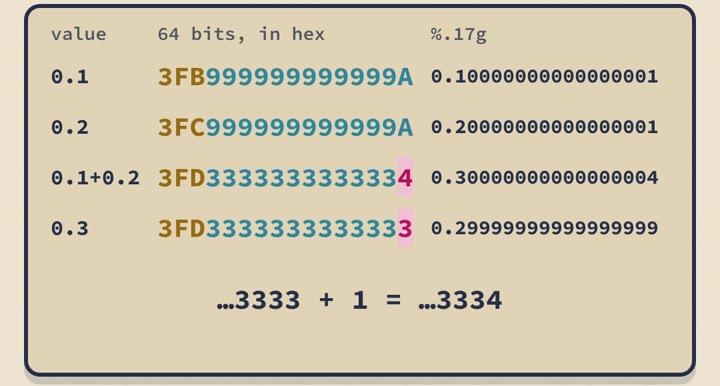
The exact sum of the two stored values is not a double. It falls exactly halfway between 3FD3333333333333 and 3FD3333333333334, and IEEE-754 breaks such a tie toward the pattern whose last bit is 0. So the sum rounds up to 3FD3333333333334, printed as 0.30000000000000004.
The literal 0.3 is rounded on its own, and the nearest double to three tenths is 3FD3333333333333, printed as 0.29999999999999999. The two patterns differ only in the last hex digit, 4 against 3. As integers they are one apart: they are neighbouring doubles, and 0.3 is the next double down from the sum.
So what does == do?
== on doubles compares the values exactly, and these are two different doubles, so c == 0.3 is false and the program prints 0.
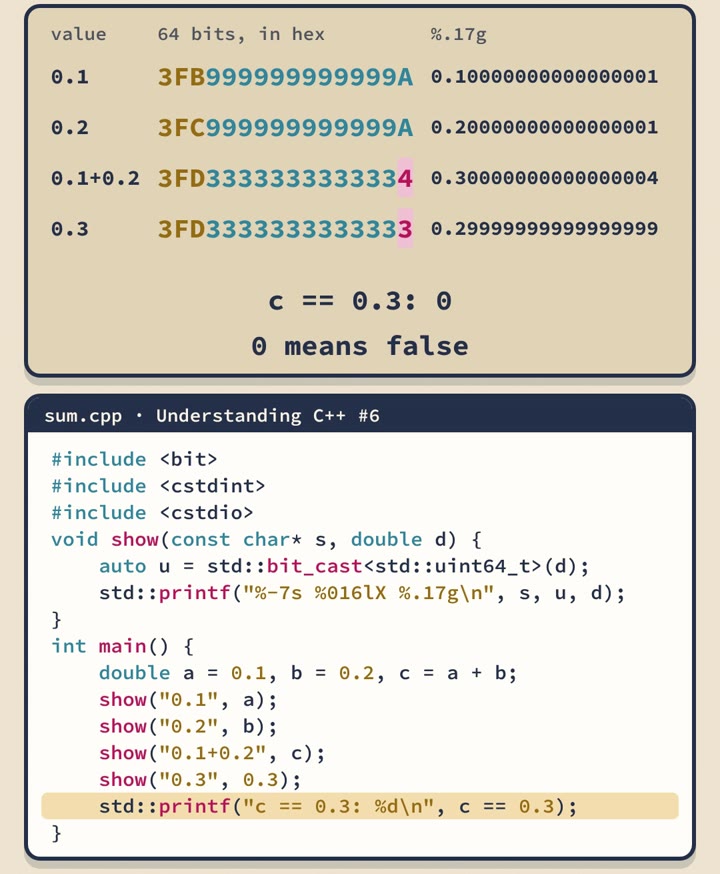
A double holds the nearest binary fraction, not the decimal you typed. When doubles come from arithmetic, compare them with a tolerance that fits the problem, for example std::abs(c - 0.3) <= 1e-9, rather than with ==.
The program and its output
#include <bit>
#include <cstdint>
#include <cstdio>
void show(const char* s, double d) {
    auto u = std::bit_cast<std::uint64_t>(d);
    std::printf("%-7s %016lX %.17g\n", s, u, d);
}
int main() {
    double a = 0.1, b = 0.2, c = a + b;
    show("0.1", a);
    show("0.2", b);
    show("0.1+0.2", c);
    show("0.3", 0.3);
    std::printf("c == 0.3: %d\n", c == 0.3);
}
0.1     3FB999999999999A 0.10000000000000001
0.2     3FC999999999999A 0.20000000000000001
0.1+0.2 3FD3333333333334 0.30000000000000004
0.3     3FD3333333333333 0.29999999999999999
c == 0.3: 0
The hex column is the whole 64-bit pattern, top byte first. In memory, on a little-endian machine, the bytes sit the other way round (9A 99 99 99 99 99 B9 3F for 0.1), as episode #5 showed. %lX matches std::uint64_t on 64-bit Linux, where it is unsigned long; -Wall prints no warning. The result is the same with -O0.
Try it
Does 0.5 + 0.25 == 0.75? Write each number as a binary fraction first and ask whether any of them needs rounding. Then change the program to check your answer.