What is a pointer in C++? 8 bytes that hold an address
What is a pointer in C++? A variable whose 8 bytes hold another object's address, lowest byte first. One real run, byte by byte, with the program.
A pointer in C++ is not a special kind of object: it is a variable whose bytes hold an address. On x86-64 that is 8 bytes, and you can copy them out and read the address in them. This walks through one real run of a short program, byte by byte: an int, a pointer to it, the pointer's own bytes, and what *p does with them.
Everything below comes from one run of the program at the end, compiled with g++ -std=c++20 -Wall -O2 (GCC 13) on x86-64 Linux. Stack addresses change on every run (the operating system randomises where the stack goes), so your addresses will differ; the sizes, the byte order and the relationships will not.
What does int x = 42 look like in memory?
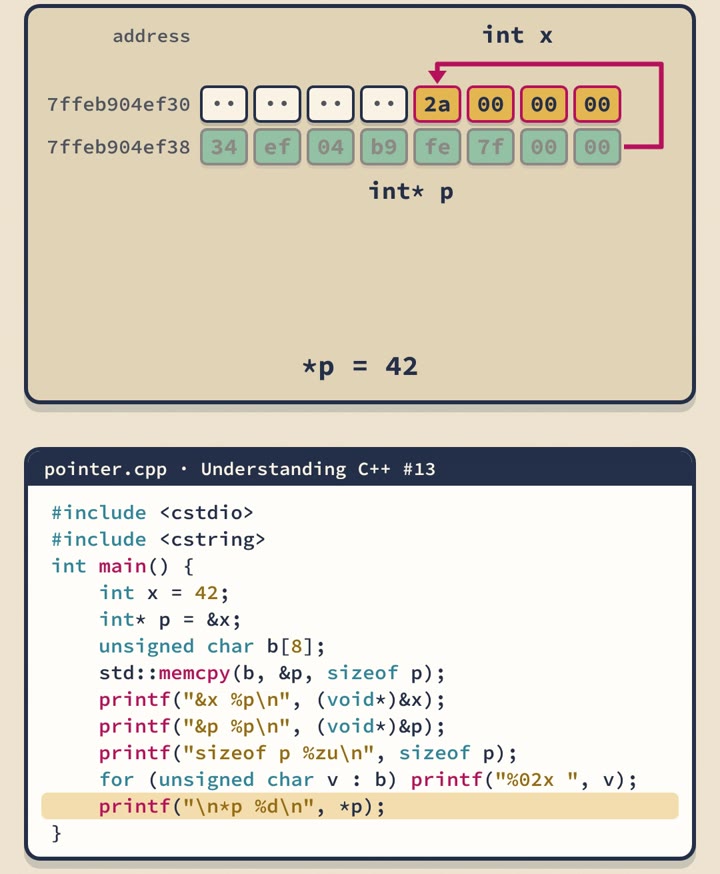
int x = 42; is 4 bytes. 42 is 0x2a, and x86-64 stores the lowest byte first, so the four bytes are 2a 00 00 00. On this run they start at address 0x7ffeb904ef34, on the stack.
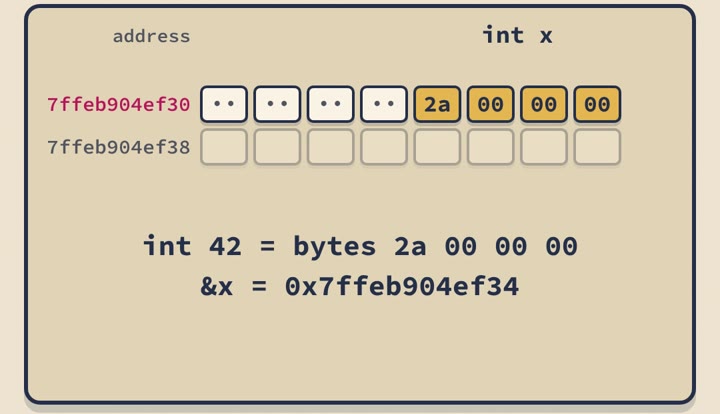
The picture shows memory 8 bytes a row. The row starts at 0x7ffeb904ef30; the four bytes before x belong to something else and were not printed, so they are drawn as dots.
What does int* p = &x store?
&x is the address of x's first byte. int* p = &x; makes a new variable p and stores that address in it. Printing &x and p gives the same number.
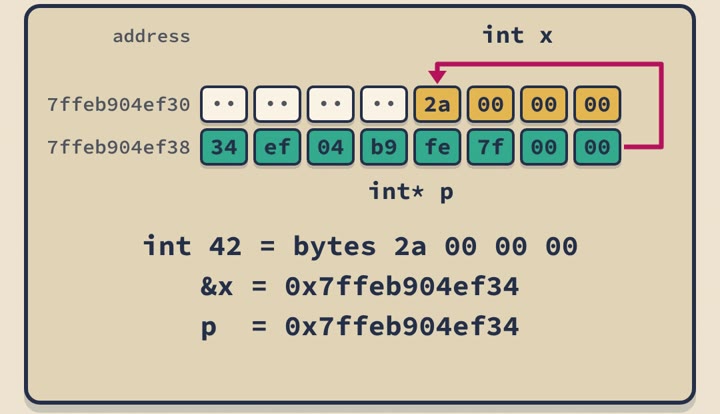
Does the pointer have an address of its own?
Yes. p is a variable like any other, so it occupies bytes and those bytes have an address. On this run &p is 0x7ffeb904ef38, which is &x + 4: the compiler put p straight after x on the stack. That placement is the compiler's choice, not a rule, but here it means the two variables sit on neighbouring rows of the dump.
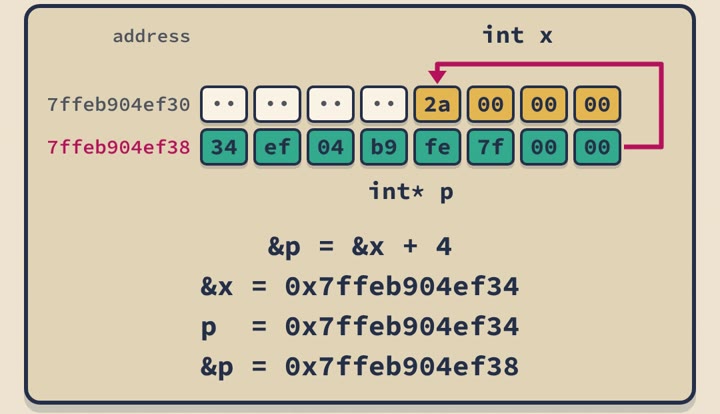
sizeof p is 8. On x86-64 every object pointer is 8 bytes, whatever it points to: int*, double* and char* all have the same size.
What is actually in the pointer's 8 bytes?
The program copies p's bytes into an unsigned char array with std::memcpy and prints them in memory order:
34 ef 04 b9 fe 7f 00 00
Read them from the last byte to the first and you get 00 00 7f fe b9 04 ef 34, which is 0x00007ffeb904ef34: exactly &x. The pointer is the address, stored like any other 8-byte number, lowest byte first.
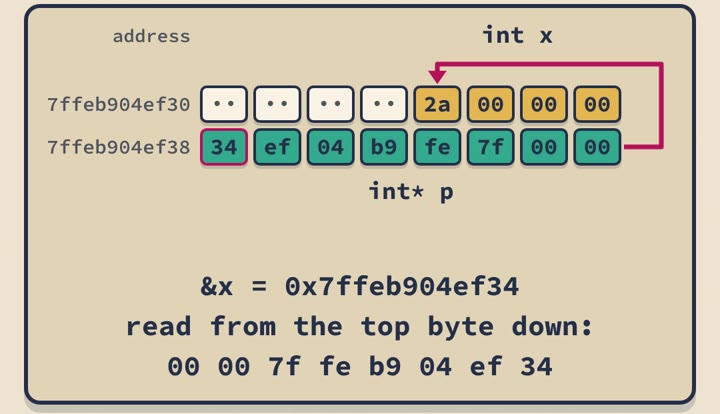
The top two bytes are zero. On x86-64 Linux, user-space addresses fit in 48 bits, so the upper 16 bits of a pointer to your own data are zero.
| what | bytes in memory (lowest first) | value |
|---|---|---|
x |
2a 00 00 00 |
42 |
p |
34 ef 04 b9 fe 7f 00 00 |
0x7ffeb904ef34 = &x |
What does *p do?
*p takes the address stored in p, goes to that byte, and reads an int there: 4 bytes, 2a 00 00 00, which is 42. The type int* is what tells the compiler to read 4 bytes and treat them as an int; the address itself is only a number.
The program and its output
#include <cstdio>
#include <cstring>
int main() {
    int x = 42;
    int* p = &x;
    unsigned char b[8];
    std::memcpy(b, &p, sizeof p);
    printf("&x %p\n", (void*)&x);
    printf("&p %p\n", (void*)&p);
    printf("sizeof p %zu\n", sizeof p);
    for (unsigned char v : b) printf("%02x ", v);
    printf("\n*p %d\n", *p);
}
&x 0x7ffeb904ef34
&p 0x7ffeb904ef38
sizeof p 8
34 ef 04 b9 fe 7f 00 00
*p 42
Run it a few times and the addresses change, but &p - &x stays 4 with this compiler, sizeof p stays 8, the last two bytes stay 00 00, and the bytes always spell &x lowest byte first. The bytes of x (2a 00 00 00), the byte order and the pointer sizes were checked with a second program that prints them directly.
Try it
How many bytes is a char* on x86-64? Work it out from what you have seen here, then check it with sizeof(char*).